My ISTE 2016 Takeaways

ISTE 2016 was held in Denver last week and this was my third time attending ISTE, first time presenting there.  As usual there was a ton of sessions and my favorites this year were the poster sessions as you get to talk more with the people sharing their information than you do during a regular…

Using Flipboard For Shared Resources

ISTE 2016 is just weeks away and as part of my preparation for this great conference, I have created a new Flipboard magazine for the event.  For those of you that do not know, Flipboard is a great tool for resource curation – at least that is how I use it.  You can easily flip…

We Don’t Use Wooden Clubs!

One of my favorites hobbies is golfing.  I started golfing in high school and still go out and play 18 holes when I get the chance.  I come from a family of golfers as my dad and grandpa both played.  When my grandpa started golfing he had to use wooden clubs, because that was the…

Google Innovator Academy – Here I Come!

Last Friday I received an email that was the best email I have received in quite a while.  I got the acceptance email from the Google Innovator Academy and I will be taking part in the Boulder Cohort this June, right after ISTE.  This was my 4th time applying which just goes to show that…

We Have To Go Beyond SAMR

One mistake that I would like correct in my work as a technology integrationist, was using only SAMR when talking with teachers a couple of years ago.  I had time with teachers in my building, not a lot of time but a couple of hours, and I decided to introduce SAMR to them.  We were…

Blurring Tools in YouTube

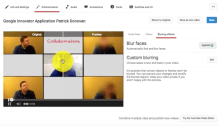
There are times where you want to blur or block out part of a video that you want to upload.  I create a lot of videos for students and other teachers, and sometimes find that there is something on my screen that I want to blur so I do not share an email address or…

Draftback – Play back your Google Docs

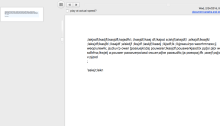
Draftback is a Chrome Extension that allows you to play back a Google Doc as if you were recording a video of all of the edits.   This simple Chrome Extension will allow a writer, or someone who is helping to give feedback to a writer, to view their writing process and see the flow…

Creating a YouTube Playlist for Students

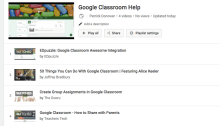
There is a tremendous amount of useful information on YouTube, along with a large amount of not useful information.  One thing we can easily do to help students, is to create a Playlist of videos related to the topic in our classroom.  This could become a great resource for them to extend or enrich their…